Another MovieStorm for iPad video.

Showing posts with label ipad. Show all posts
Showing posts with label ipad. Show all posts
Friday, January 18, 2013

Wednesday, January 2, 2013
Dichotomies of Sight and Sound
One of the ideas I've been playing around with recently is the combination of unexpected combinations of musical and visual performance. Here are a couple of working concept videos that used iPhone and iPad tools to create the effects.
The first is an animation created with MovieStorm to lip-sync The Speed of Sound by Tech N9ne. The second was created using Mojo Masks to overlay a realtime mask on a live performance video capture.
The first is an animation created with MovieStorm to lip-sync The Speed of Sound by Tech N9ne. The second was created using Mojo Masks to overlay a realtime mask on a live performance video capture.
Wednesday, June 13, 2012
Headline Hijinks
Tired of the endless barrage of partisan news stories? Hijack the media with your own headlines! Here's a fast and easy mobile workflow:
- Screen capture from Flipboard
- Overlay new headline in Comic Life
- Crop (if needed) in Photogene
Monday, January 23, 2012

Sunday, January 8, 2012
Bad Santa?

One of the most valuable things I've learned from virtual worlds is that our conception of reality is based as much upon imaginary projection as objective perception. In a virtual world such as Second Life we can easily remember that there is software behind the beautiful sky we see. With a little more effort and attention we can even keep in mind that there is a human of unknown age, gender and appearance behind the avtar we're interacting with.
Being able to shift awareness in and out of immersion in virtual life is a great exercise for awakening to the analogous phenomenon in the atomic world. Our experience of physical life is no less a construction of our minds. The dome of Earth's sky is actually blue light scattered across the atmosphere. Although we can't read other people's minds, we usually act as if we know exactly what they're thinking.
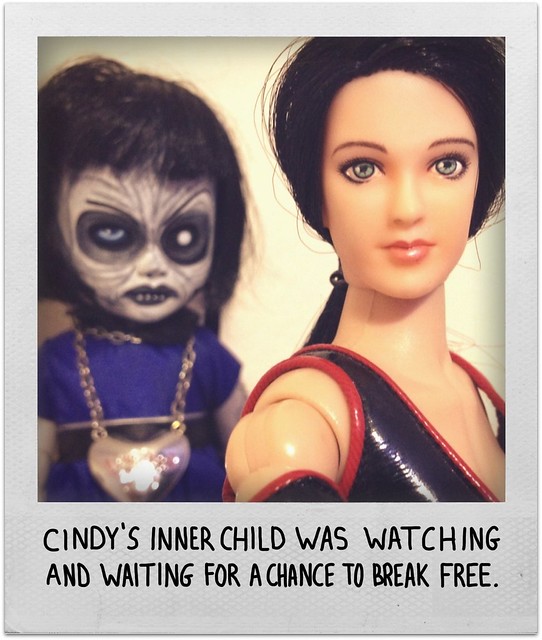
For the past year or so, I've been playing around with using dolls and action figures to expose how our minds reflexively construct personality, identity and story. For instance, the toys in the image above weren't posed. The were just sitting on a shelf at an antique mall. But one glance was all it took for my mind to reflexively translate the sensory impressions into an evocative story. By noticing and capturing this mental process with toys, my hope is that I'll have an easier time remembering it with people. Someday.
Monday, December 26, 2011

Thursday, December 22, 2011
Monday, December 19, 2011
Buffy is Exhausted

After having a lot of fun with 100 Word Stories, I recently stumbled onto an even more condensed micro-tale format in The Tiny Book of Stories. It's an anthology of 67 works that combine a few lines of text and an illustration. It's likely you'll see a lot more of these here over the next few weeks while I'm busy working on a new long-form comic, "The Death of Botgirl." (Yes. That was a teaser.)
Saturday, December 17, 2011

Sunday, April 10, 2011
The Lazy Avatar's Guide to iPhone-Powered Machinima
Machinima ( /məˈʃiːnɪmə/ or /məˈʃɪnɪmə/) is the use of real-time 3D computer graphics rendering engines to create a cinematic production. Most often, games are used to generate the computer animation. WikipediaOver the past three years I've experimented with many methods, styles and platforms in the course of creating about 90 machinima. I love making videos and the medium has been a very important aspect of my creative life.
One of my reasons for living a fairly public life through an avatar identity is to encourage and support the use of virtual worlds as a platform for creative expression. Although virtual photography is a pretty universal medium of artistic expression, only a relatively small percentage of the avatar community makes machinima. I suspect the main reason is that the technical aspects of video creation are relatively more complex and intimidating. So I thought it would be helpful to share a quick and easy method I've been using to create simple music-video style machinima using an iPhone, iPad or iTouch. If you're like me and are too lazy for the 48 Hour Film Project, here's my 4.8 Hour Machinima Project methodology:
- Teleport into a cool setting
- Activate a dance animation
- Capture a variety of shots using your mobile device's camera
- Start a new iMovie project
- Add a music track from iTunes Library
- String together some of your shots
- Export video
- (optional) Use a program like Silent Film Director or Cinema FXV to spice up the look
- Upload to Vimeo, YouTube or Flickr
I was playing around in IMVU this weekend so I decided to shoot a couple example videos there. I used the same avatar look and dance animation in both videos. I changed the set, the effects and the music to create two very different feels. They were each created from start to finish in just a few hours.
Sunday, February 6, 2011
First Take on Blue Mars Mobile Including Over-Hyped Video Trailer
Blue Mars developer Avatar Reality announced a restructuring last month that is shifting focus to a mobile version of their platform. They released an initial free version for the iPhone and iPad last week, which:
One issue is that it only runs on a Windows. Although the client supposedly can run under Parallels or Boot Camp on a Mac, I couldn't get it running despite three hours of trying. Didn't find any useful help in their forums. So I dug up a mid-level Windows notebook and finally got it working after downloading a huge file and installing the most recent version.
Even after logging on successfully, it was way more frustrating than fun. The response was very sluggish and it took over an hour to find a shop with decent clothing for sale. Along the way I downloaded three additional 300+ megabyte locations. Nope. Not fun at all.
Needless to say, few iPhone or iPad users are going to be willing to go through hours of downloads and searching just to create a marginally customized avatar just for viewing. But despite the initial kludginess, I'm still optimistic that when they bring avatar customization into the mobile app, the experience will be much better and it will eventually evolve into a fun 3D avatar chat application:
. . . allows users to view and rate avatars and fashions from Blue Mars, which populates the results on the "Top-Rated". They can also use the "Recents" option to track avatar updates and see the latest fashions. From Blue Mars blogI decided to give it a try. The initial version is very limited, but feels really responsive. Downloading an avatar takes only about ten seconds. Once it's there you can pan, rotate and zoom with standard iOS gestures. You can view a list of avatars by either popularity or recency, and also search for them by name. Unfortunately, at this time you can only create or modify an avatar using their PC client. Which is a big problem.
One issue is that it only runs on a Windows. Although the client supposedly can run under Parallels or Boot Camp on a Mac, I couldn't get it running despite three hours of trying. Didn't find any useful help in their forums. So I dug up a mid-level Windows notebook and finally got it working after downloading a huge file and installing the most recent version.
Even after logging on successfully, it was way more frustrating than fun. The response was very sluggish and it took over an hour to find a shop with decent clothing for sale. Along the way I downloaded three additional 300+ megabyte locations. Nope. Not fun at all.
Needless to say, few iPhone or iPad users are going to be willing to go through hours of downloads and searching just to create a marginally customized avatar just for viewing. But despite the initial kludginess, I'm still optimistic that when they bring avatar customization into the mobile app, the experience will be much better and it will eventually evolve into a fun 3D avatar chat application:
Future updates will include such enhancements as avatar customization, interaction with other social networking platforms, the ability to chat with other Blue Mars users, and integrated shopping of clothing and other items via Apple's in-App purchase feature. From Blue Mars blogFor now, here's a totally over-hyped trailer I put together showing both the iPad and iPhone versions.
Subscribe to:
Posts (Atom)